AI Video Generator: What Is It & How Does It Work?
by Daniel Stock— min read
Artificial intelligence has made its way into just about every digital niche, including video production. AI video generators allow you to create content faster and at a lower cost than ever before. Whether for social media marketing or Connected TV advertising, AI videos can make a huge impact when done correctly.
However, if you’ve never used an AI video generator before, you may have questions about how these tools work and what advantages they provide. Here’s everything you need to know.
What Is an AI Video Generator?
An AI video generator is software that uses artificial intelligence to automatically create video content. Some solutions require you to input branded assets and create a prompt. Others only require your website URL to build a brand profile.
For marketers, it makes it easier to produce scalable, on-brand video creative that can be tested, optimized, and deployed faster across performance channels.
Main Types of AI Video Generators
The most common AI video generator types include:
Text-to-Video Generators
Text-to-video AI platforms are one of the easiest platforms to use. All you need to do is type up a quick prompt and let the AI generator do the work. While it’s important to give the software clear guidance, you don’t need an entire script. You can experiment with different prompts until you are happy with the results.
Though in most cases, you’ll get far better results the more specific and detailed your prompt.
Image-to-Video Generators
Image-to-video AI tools turn static images into dynamic videos. The AI platform does this by using the images as inspiration. For example, some platforms like QuickFrame AI allow you to upload a product photo that you want featured in your video ad. It’s a great option if you have a library of strong images but don’t have the bandwidth for traditional video production.
Social Media Video Generators
If your goal is to expand your reach on social channels like Instagram, Facebook, and TikTok, you need an AI video generator for social media. These solutions can create engaging short-form videos that are snappy and to the point. Use them to pump out pre-formatted and engaging content for your favorite social networks.
Learn More About Specific Social Networks
- AI video generator for YouTube
- AI video generator for Facebook
- AI video generator for Instagram
- AI video generator for TikTok
AI Ad Generators
An AI video generator for advertising focuses on performance-based, on-brand ad creation. They typically include features such as:
- Templated or style-based ad generation
- Brand profile building
- Making variations for A/B testing
- Auto-formatting for multiple platforms
Some tools allow you to publish directly to ad platforms. With that in mind, make sure the software supports your preferred ad channels.
Advantages of AI Video Makers
There are several noteworthy AI video generator benefits, including:
- Speed and faster time to market: AI video generators can turn scripts or concepts into finished videos in minutes, dramatically shortening production cycles compared to traditional shoots that take days or weeks.
- Cost efficiency at scale: By eliminating the need for production crews, studios, and on-camera talent, AI significantly reduces video production costs.
- Scalability and personalization: Marketers can quickly generate dozens of variations, localize content across languages, and tailor videos for different audiences or platforms.
- Built-in brand consistency: AI tools rely on defined brand profiles and templates to ensure fonts, colors, logos, and messaging stay consistent across every asset.
- Accessibility and multi-platform readiness: No-code, drag-and-drop interfaces make video creation easy for non-technical users.
Disadvantages and Limitations
However, as with all tools, AI video generators have a few drawbacks to consider:
- Limited creative and emotional depth: AI video generators rely on patterns, not lived experience. This sometimes results in storytelling that lacks subtle emotion, cultural nuance, or true brand personality.
- Inconsistent realism and technical flaws: From physics violations to uncanny human motion–AI can sometimes still struggle to maintain believable, high-quality visuals, especially in longer-form video.
- Risk of sameness and generic output: Heavy dependence on templates and pre-trained styles can lead to repetitive, formulaic content that makes it harder for brands to stand out.
- Brand control and tone misalignment: Without strong inputs and human oversight, AI-generated videos can drift off-brand or miss the mark on tone, context, or audience expectations.
- Operational, ethical, and legal risks: Results are highly input-dependent, and growing concerns around copyright, bias, and misuse (like deepfakes) introduce real brand and trust considerations.
With that said, the right tool can make all the difference in the world, highlighting all the advantages of AI video while making the disadvantages much less noticeable.
How AI Video Generators Work?
Learning how to make AI video is simple with tools like QuickFrame AI. All you need to do is follow these five steps:
Step 1: Choose a Style
In QuickFrame AI, Styles act as your creative starting point, providing a ready-made look, tone, and structure for fast, on-brand video production.
Selecting a Style auto-applies its blueprint, shaping:
- Format: Determines the aspect ratio and length required for your target platform.
- Cinematography: Outlines the camera perspectives, rhythm, and shifts that create the ad’s visual rhythm.
- Tone and Feel: Sets the color scheme and atmosphere to amplify your ad’s emotional resonance.
- Story and Structure: Directs the storytelling tempo and sequence of scenes to deliver your key points effectively.
- Music: Chooses audio tracks that align with the desired vibe and cadence.
- Voiceover: Shapes the narration’s style and presentation for a unified end result.
Align your Style with the platform and goals. Test a few to nail your brand’s voice.
Step 2: Build a Brand Profile
Your brand profile guides QuickFrame AI in creating videos that remain true to your established visual identity. During account setup, simply input your company’s website URL, and the platform automatically generates this profile by extracting essential elements, such as your logo, fonts, and core brand description, directly from the site.
For incorporating specific products, marketers can easily upload custom images as supplementary assets.
Step 3: Generate Your Video
Within a few minutes, the QuickFrame AI will use your inputs to create a draft video. The software will even format the video for your preferred platform so that it can be uploaded as soon as your editing team polishes it up.
Step 4: Edit and Refine
QuickFrame AI often delivers spot-on videos right out of the gate, but refining them ensures they align perfectly with your campaign goals and drive measurable results.
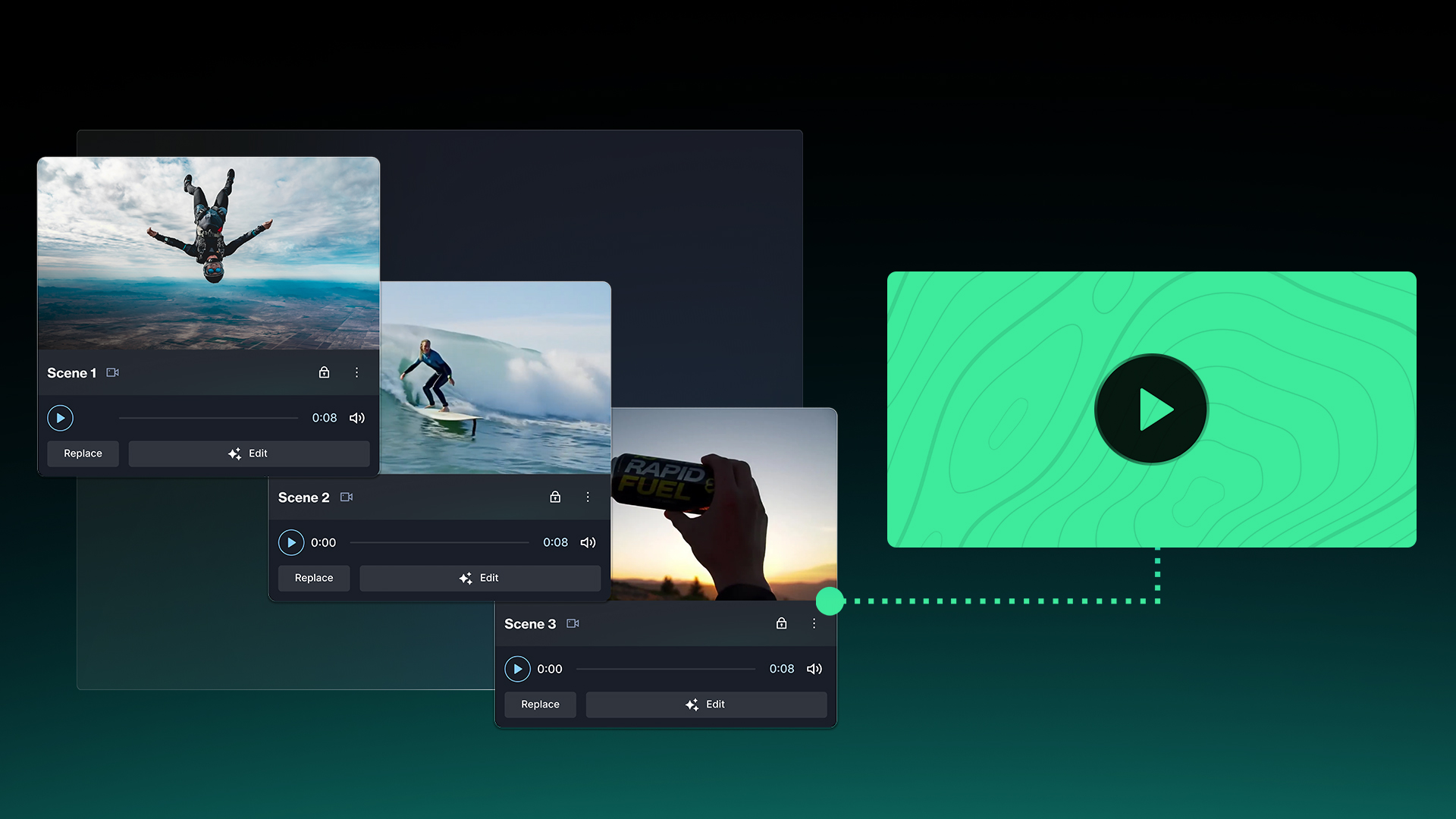
After generation, your video lands in the Story tab—a streamlined workspace for guiding the big-picture narrative and making swift adjustments.
In Story, you can:
- Drag and drop scene cards to rearrange the order and refine pacing for better viewer retention.
- Insert a blank scene with + Add Scene or delete one to tighten your ad’s focus and flow.
- Swap out visuals via Replace, sourcing from AI-generated content, Getty library options, your Asset Library, or custom uploads.
- Tweak the voiceover script per scene for sharper narration or switch the background audio to align with your campaign’s energy.
- Refine AI-generated scenes using the Edit feature to re-prompt for customized visuals, moods, or on-screen elements.
- Hit Preview to watch the complete ad and verify smooth transitions and timing before advancing.
For granular tweaks, transition to the Editor tab, QuickFrame AI’s comprehensive timeline-driven suite that empowers precise customization.
In Editor, you can:
- Layer in text overlays, brand logos, images, video segments, or sound elements across scenes for added depth.
- Select and drag elements on the Stage canvas to reposition or scale them for precise visual composition.
- Drag bars in the Timeline to control element start times, durations, and layering for seamless stacking.
- Browse and integrate uploaded, AI-created, or stock media directly through the dynamic Edit Panel.
- Customize per element with adjustments to color, dimensions, placement, and animation timing for professional polish.
- Run a Preview whenever needed to simulate the final playback and catch any refinements for optimal performance.
Remember, AI videos can be excellent right out of the gate. But it’s really important to add those finishing touches. A little extra effort can be the difference between a video that falls flat and one that lands with impact.
Step 5: Publish Directly
With your video polished and ready, QuickFrame AI lets you push it straight to connected accounts like Google Ads for immediate campaign integration. Expand your reach further by publishing directly to Meta Ads Manager, TikTok Ads Manager, or MNTN Performance TV.
Features to Look for in an AI Video Generator
When deciding on a tool to use, look for the following AI video generator features:
- Custom brand profile and personalization support
- Platform-ready formats and styles
- Text-to-video and image-to-video options
- Natural AI voiceovers and subtitles
- Speed and scalability
- Workspace collaboration for teams
Additionally, make sure the platform has user-friendly editing features so that your team can put the final touches on your content.
Best Practices for Generating AI Videos
Choosing a high-quality AI video generator for business will set your team up for success. But, to get the best output from your AI video maker, you will need to leverage certain best practices, including:
- Use detailed prompts
- Upload strong brand assets
- Keep your scripts short and punchy
- Test multiple variations
- Edit before publishing
Are you an e-commerce brand? Learn more about AI video generator for products.
Common Mistakes to Avoid
AI isn’t magic. Well, it kind of is, but you still have to wield it properly to achieve high-quality results. You also need to be wary of these common mistakes:
- Using vague prompts will likely yield a video that misses the mark
- In the same regard, overly complex prompts can do the same. Find the sweet spot between being too vague and not going overboard
- Not uploading enough, or uploading low-quality branded elements
- Overloading viewers with too much text
- Relying 100% on generated content without refining it
- Choosing the wrong audio or music that doesn’t match the pacing of the video
- Using the incorrect social media video ad specs for your platform
A skilled team is the difference between good AI-generated videos and exceptional ones.
How QuickFrame AI Changes the Game
Understanding AI video generation is one thing—putting it to work is another. With QuickFrame AI, you can see exactly how it all comes together: choose a Style, apply your brand automatically, generate and refine video ads in Story or Editor, then publish directly to MNTN Performance TV, Meta Ads Manager, TikTok Ads Manager, or Google Ads Manager. It’s AI video creation built for advertisers, from concept to campaign.
See how AI video generation works in practice with QuickFrame AI.
AI Video Maker: Final Thoughts
An AI video generator can save you time and reduce your marketing costs. It’s an invaluable resource for creating content for social media, CTV, and your website. Tools like QuickFrame AI are redefining how teams generate and publish videos at scale. Rethink how you approach visual marketing and explore our AI video maker today.