What Are the Features of AI Video Generators?
by Daniel Stock— min read
Artificial intelligence has transformed how businesses create video content. What once required a full creative team and expensive equipment can now be accomplished in minutes with the right AI tools.
To find the right option for your business, you need to know the core AI video generator features that power high-quality, scalable video production. Here’s everything you need to know.
What Are AI Video Generators?
AI video generators are software platforms that use artificial intelligence to turn inputs like prompts, product details, and brand assets into ready-to-use video creative—often assembling scenes, on-screen text, and audio into a complete spot.
For marketers, they’re a faster way to scale and iterate video, making it easier to produce and test more creative variations across video marketing channels without slowing down your campaign momentum.
Learn More: How to Make an AI Video
Introducing QuickFrame AI
QuickFrame AI is one of the most advanced AI video generators for advertising, built exclusively for marketers and performance-driven brands. Our user-friendly system is packed with the most sought-after features of AI video generators. You can generate content by choosing a style and automatically create a brand profile by providing your website URL.
Once your content is ready, you can publish it directly to one of several supported platforms, including MNTN Performance TV, TikTok Ad Manager, Google Ad Manager, and Meta Ad Manager.
Here’s a closer look at the features QuickFrame AI brings to the table:
1. Style-Based Video Generation
Start by exploring QuickFrame AI Styles and selecting the one that matches your platform, format, and campaign goal. The style you select will define the pacing, tone, and cinematography of your video. QuickFrame AI offers several different unique styles, giving you the freedom to create content on your terms.
2. Automatic Brand Profile Creation
Many artificial intelligence video makers require you to upload branded assets to create your brand profile. QuickFrame AI instantly builds a brand profile using your company URL. Once provided, our platform takes it from there, pulling in key assets like your logo, fonts, and brand description automatically.
QuickFrame AI will use your brand profile to create all future content, which saves time and ensures consistency across every campaign.
3. AI-Powered Script and Scene Generation
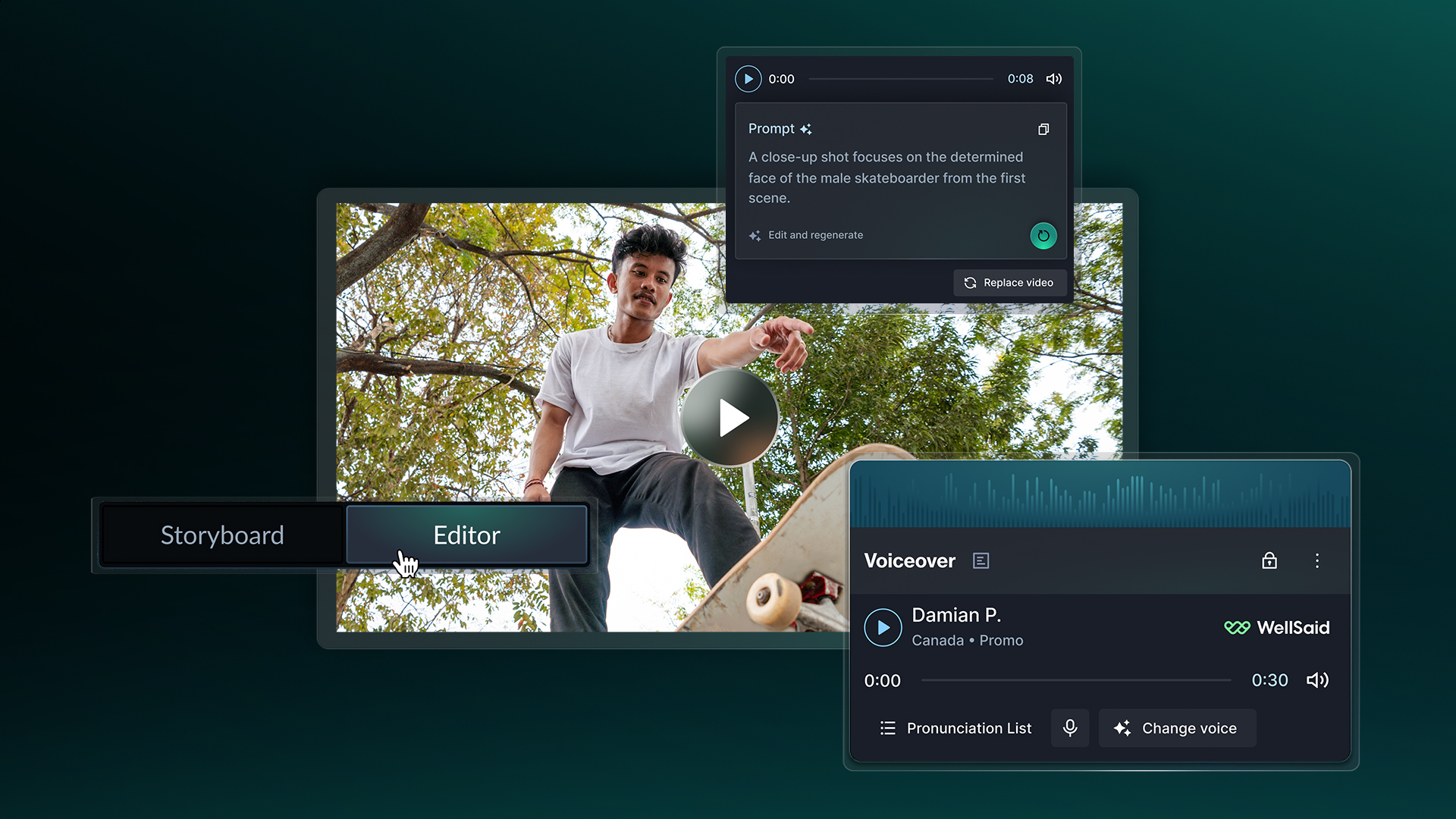
Our artificial intelligence software uses your brand profile and any creative prompt you provide to build a script. QuickFrame AI also builds a complete video, which includes music, narration, and engaging scenes.
The entire process takes minutes, not hours or days. Your team can use all of that extra time to focus on campaign planning, strategy, editing, and testing out content.
Related: Convert Text to Video With AI
4. Dual Editing Modes: Story and Editor
QuickFrame AI stands out for its dual editing modes. The Story Tab is built for quick, high-level edits, such as reordering scenes, adjusting pacing, replacing visuals, and more.
Want to take a deeper dive into the content? The Editor Tab allows your team to fine-tune visuals, text, audio, and animation. Polish up your content and get it ready for publishing.
5. Integrated Voiceover and Music Tools
Apply AI-generated music and voiceovers that fit your brand’s pacing and tone. Our AI automatically applies music and narration during the initial video creation process.
However, you can adjust the voiceover script and fine-tune audio during the editing process. The goal is to capture the essence of your brand and provide a consistent experience for consumers.
6. Stock and Generative Media Library
QuickFrame AI integrates with Getty Images so you can pull stock video and images. Additionally, our platform integrates with generative AI models for custom content creation. Swap out frames or images from your video with media from our built-in library. Try out different imagery and see what clicks with your audience.
Related: Convert Image to Video With AI
7. Built-In CTV Compliance and Creative Checks
QuickFrame AI automatically formats video for leading platforms, including for Connected TV advertising. Your team can preview and edit your videos to ensure that every aspect aligns with your vision.
8. Direct Publishing to Ad Platforms
Many video makers require you to download content and then re-upload it to each platform. You may also have to handle formatting yourself, which slows down your workflows.
QuickFrame AI solves this problem by publishing directly to popular ad platforms, including:
- MNTN Performance TV
- Meta Ads manager
- TikTok Ads Manager
- Google Ads Manager
Once you’ve published your content in the desired ad manager, you can activate it or schedule it for a future campaign. Each video will be properly formatted and ready to go.
Related: Social Media Video Ad Specs & Placements Guide
9. Collaboration and Project Management Features
QuickFrame AI includes built-in collaboration features designed to keep you in control of every project. Your team members can effortlessly collaborate on video content and produce better videos faster. You’ve built a great team filled with diverse talent. Let QuickFrame AI empower them to get more done and expand your reach.
10. Built for Scalability and Speed
QuickFrame AI allows you to create videos in minutes, not hours. Use that extra time to scale up your video library and test out variations for maximum impact. Our platform grows with you, allowing you to effortlessly tap into multiple channels.
Learn more about our AI video generator for social media
QuickFrame AI: The Last Video Generator You’ll Need
When it comes to AI video generators, features matter—but how they work together matters more. QuickFrame AI brings style-based generation, automatic brand profiles, flexible editing, and built-in audio tools into one streamlined platform built for advertisers. Create polished, on-brand video ads, refine them in Story or Editor, and publish directly to MNTN, Meta Ads Manager, TikTok Ads Manager, or Google Ads Manager—without exporting files or juggling tools.
Explore what a professional-grade AI video generator can really do with QuickFrame AI.
AI Video Generator Features: Final Thoughts
Harnessing the features of AI video generators will allow you to create more content faster. You can maintain a consistent presence on key platforms, such as Facebook, Instagram, and TikTok. Explore top options like QuickFrame AI and tap into the power of artificial intelligence video makers.